Showing posts with label microsoft. Show all posts
Showing posts with label microsoft. Show all posts
Saturday, August 27, 2016
Cara menggunakan Fungsi terbilang di Microsoft Excel
Cara menggunakan Fungsi terbilang di Microsoft Excel
Setelah pada artikel sebelumnya saya terangkan bagaimana "Membuat fungsi terbilang di microsoft excel" dengan memanfaatkan VBA Script di Ms. Excel 2010 selanjutnya saya kasih nih Bagaimana cara menggunakannya . . . !
Kalau mau baca dulu Bagaimana cara membuatnya silakan Klik saja ini : Membuat Fungsi Terbilang pada Microsoft Excel
Sebenare manfaate buat apa sih gan ? tanya lagi tanya lagi...he..he... udah baca belum sih ? baca dulu donk artikel "Membuat fungsi terbilang pada Microsoft Excel"
Bagi para pemegang uang, Bendohorowan - Bendohorowati, pemegang Kas dsb yang biasa memanfaatkan komputer untuk membuat laporan keuangan, kwitansi, A2 dll fungsi ini lumayan bermanfaat lo.... biar tidak keliru kalo misalkan kita menulis jumlah uang dengan terbilang hurufnya.
Langsung saja gan kita mulai bagaimana cara menggunakannya ???
1. Buka Microsoft Excel dulu ya..!
2. Sudah donwload belum nih fungsi terbilangnya ???
Kalo belum download Pluginnya dulu disini
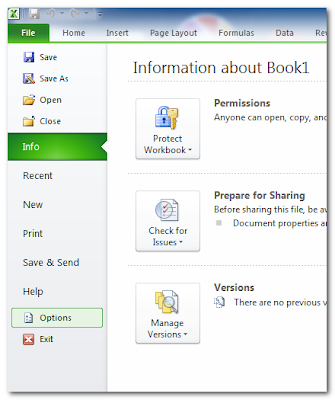
3. Kembali ke Ms. Excel Pilih Menu File => Option
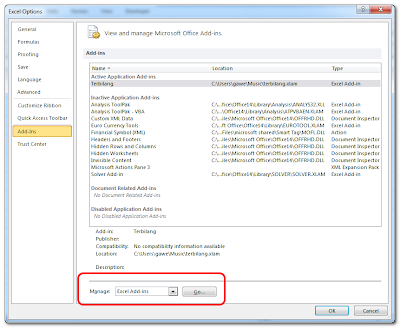
4. Pilih Add-Ins => Manage ----> Go
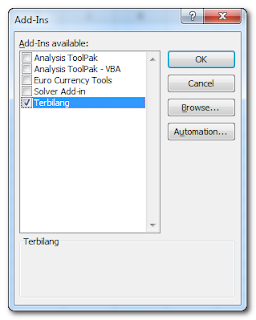
5. Browse pilih Plugin terbilang, contreng
6. Sekarang kembali ke Ms. Excel Coba tuliskan angka salah satu cell, contonhya seperti berikut
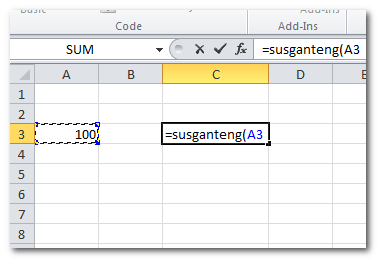
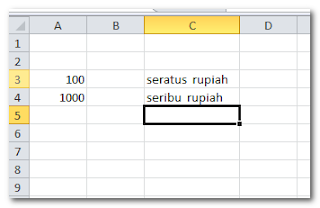
berhubung dalam Plugin fungsi terbilang nama fungsinya adalah susganteng, ya cara memanggilnya seperti itu, biar keingat trus nih sama saya. tapi tenang saja agan...agan... bisa kok ngerubah nama fungsinya, kan sudah saya lampirkan sorce code nya, tinggal download saja. he..he....
untuk download Sorce Code klik baca artikel bagaimana membuat fungsi terbilang
Silakan dicoba yah.....!!!
Semoga Bermanfaat !

Friday, August 26, 2016
Download And Review Microsoft Office Professional Plus 2013 32Bit Free
Download And Review Microsoft Office Professional Plus 2013 32Bit Free
Collar jobs are like typing, data processing and become an important figure today. Microsoft Office is a Microsoft product has been experienced in this case, starting with the release of Microsoft Office 2003, then re-released the latest version in 2007 and 2010 with the name of each Microsoft Office 2007 and Microsoft Office 2010.
 |
| Microsoft Office Professional Plus 2013 |
At Microsoft Office Professional Plus 2013, in addition to already connected to the cloud via One Drive in this version microsoft presenting themes can also be downloaded directly from the Internet, accessing email via outlook 2013 become easier with a charming look.
With looks interesting and full of attractive living movement, making Microsoft Office Professional Plus 2013 ev used for an office job.
Features Microsoft Office Professional 2013
What new features Microsoft Office Professional 2013, see here:
- Office Suite
- 15 GB online storage with OneDrive
- Your Office away from home
- Include Word 2013, Excel 2013, PowerPoint 2013, OneNote 2013, Outlook 2013, Publisher 2013 and Access 2013.
Vedeo Review
You can watching this vedeo to see more features from Microsoft Office Professional 2013
Source: Youtube
Link Download
You can dawnload Microsoft Office 2013 Profesional Final at links bellow:
- Download Microsoft Office Professional 2013 Final Edition at this website, or
- Link alternative Microsoft Office Professional 2013 Final Edition, and
- You can download Microsoft Office Professional 2013 Final Edition at official website Microsoft.
File Description
- File name: OfficeProfessionalPlus_x86_en-us.img
- Size: 666,2MB
- Copyright: Microsoft
- License: Free 30 day, Buy to actived.
How To Install
To install Microsoft Office 2013, following steps bellow:
- Download file Microsoft Office Professional 2013 Final Edition at links above
- Open your download file location
- Extract file Microsoft Office Professional 2013 Final Edition
- [Double click] setuo to start instalation
- Insert your license
- Waiting for finishing instalation
- Done
Thank For Visiting. Enjoy!
Subscribe to:
Posts (Atom)