Showing posts with label feed. Show all posts
Showing posts with label feed. Show all posts
Sunday, August 28, 2016
Best offline RSS feed reader for Android FeedMe
Best offline RSS feed reader for Android FeedMe
I want to take a second here to give a huge shout-out to "FeedMe" an Android offline RSS reader app I found and have now been using as my daily go-to feed reader. This thing is a simple, pleasurable, super light-weight client that syncs through either your Feedly or your Inoreader. But where it shines brightest is in its offline support, because it does exactly what I wanted.
Here are two situations, one Im in almost every day, the other not nearly often enough:
- I take the subway in Seoul but, especially during peak commuting time, the subway Wi-Fi sucks. I get dropped constantly, and end up using my 4G connection to read my RSS feed articles. Damn! Wish my phone had just pulled them all in before I left the house this morning, so I could just read/browse them offline now.
- I go abroad on vacation, and my hotel has free Wi-Fi (as does the local McDonalds) but I have no internet connection out on the beach. Damn! Wish I could catch-up with my article reading there!
True, one could use Pocket for reading offline, but one would need to have stored manually-chosen articles into it first. Thats fine, but I just want to read all my incoming news and blogs offline, like in the days of newspapers!
FeedMe exactly takes care of this. In my daily life, it automatically synchronizes itself with my Feedly/Inoreader account every two hours (user editable), only when Im connected to Wi-Fi (user editable), so during commute time I always have the latest already stored and ready for me. It smoothly and perfectly matches up with the desktop version later, even if Ive made edits/changes on my computer since after the last sync. And after Ive read and it resyncs again, stars/favorites, tags, send-to-Pockets, everything just resyncs perfectly. I cannot express how convenient and reliable this is.
And best of all, for feeds that just provide a one-paragraph summery of snippet of the article, FeedMe can (if you choose so in the settings) automatically fetch the entire article in a mobilized ("easy reading") version, and keep that for offline reading. LET THAT SINK IN. The only major downfall of RSS --that being that some sites feeds make you "click-through" to get the full article content-- is a non-issue. The pure reading experience, with full, cleaned, offline articles, cannot be beat. Only suckers are wasting their time/data browsing Twitter timelines, clicking headline links, and zooming around some ad-infested site (ironic given that ads run on mine).
Even saving Twitter article links automatically to Pocket, while achieving a similar end, isnt as efficient/convenient. The closest to doing this well would be something like Flyne, but as you can guess from this post, you know where my sympathies lie. Flyne seems to (disclosure: I didnt try it) combine your Feedly feeds with your Twitter timeline for offline use... but of course, Inoreader lets you subscribe to you Twitter timeline and it appears as a normal feed, the end result of course meaning that all those tweets will be synchronized for offline reading by FeedMe assuming (like me) you use it as an Inoreader client. That means FeedMe is an offline Twitter client also, as well as offline RSS! Heres an example of that. Heres the "article" i.e. the tweet I had posted for this blog entry:
Even saving Twitter article links automatically to Pocket, while achieving a similar end, isnt as efficient/convenient. The closest to doing this well would be something like Flyne, but as you can guess from this post, you know where my sympathies lie. Flyne seems to (disclosure: I didnt try it) combine your Feedly feeds with your Twitter timeline for offline use... but of course, Inoreader lets you subscribe to you Twitter timeline and it appears as a normal feed, the end result of course meaning that all those tweets will be synchronized for offline reading by FeedMe assuming (like me) you use it as an Inoreader client. That means FeedMe is an offline Twitter client also, as well as offline RSS! Heres an example of that. Heres the "article" i.e. the tweet I had posted for this blog entry:
 |
| Reading tweets offline in FeedMe |
Now let me show you an example of the full article fetching for offline reading feature of FeedMe.
Heres the feed for the Korea Times (no longer advertised on-site but available here) as it looks in FeedMe:
 |
| Korea Times news feed, synced for offline reading by FeedMe |
All these articles are stored offline on my phone. Lets start reading. That first article looks good. Click. (Ive switched the theme from "light" to "night" just to show you a taste of how it can look. Personally, I prefer night-theme. Easier on the eyes, easier on the battery)
 |
| Korea Times "snippet only" feed article, before applying webpage download setting |
Damn! Korea Times is one of those sites that only provides a snippet! BUT WAIT. Because I marked this subscription as a "get mobilized content" one in the settings, I see this instead, and can go ahead and scroll through the whole article, never leaving the FeedMe app, and never going online (disregard the fact that I was indeed connected to Wi-Fi at the time):
 |
| Korea Times full article, fetched automatically and stored offline by FeedMe |
You can toggle between the feed (snippet) and web (full article, mobilizer reading) views manually, on a per-article basis, at the top-right above the headline. To have FeedMe automatically download all such full-article views for a particular site/blog: go to any article in the subscription --> hit the three-button menu icon --> check the third box "Download web page when start sync". Note too that while this particular article has no images, images do sync for offline view as well.
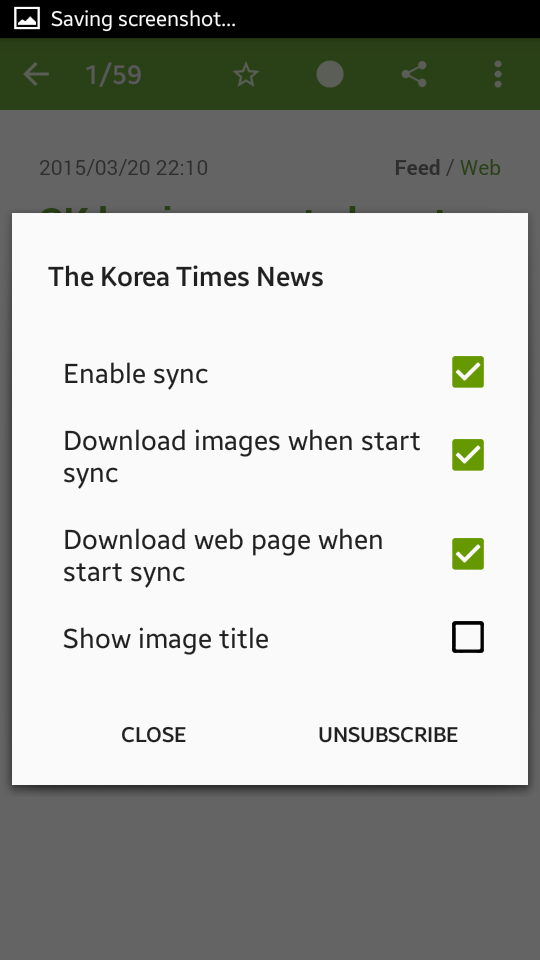
Even when offline, you can share the content (uses Androids native sharing), send it to Pocket, add Feedly/Inoreader tags to it, or unsubscribe, all of which will sync-up during your next synchronization.

Theres not much to this entry aside from me being a fanboy, I know. I just wanted to demonstrate a simple and reliable solution to a problem that always annoyed me, but that I had assumed was just part of modern Internet life. If, like me, you ever wished for an easy, simple way to regularly read all of your news/blogs offline and full at your convenience, I cannot recommend FeedMe enough. This brilliant little app deserves wider fame.

FeedMe (Free) | Google Play

Friday, July 29, 2016
Feedly vs Inoreader Part 3 Shots Fired Reddit and Websta RSS feed issues
Feedly vs Inoreader Part 3 Shots Fired Reddit and Websta RSS feed issues
Note 1: As I continue to agonize over whether to commit to Feedly or Inoreader as my RSS reader of choice, I look for areas in which one objectively excels over the other. This is now a very short Part 3 of that agonizing. See Part 1, Part 2, Part 4, and Part 5 if youre interested.
Note 2: Information has been added as "UPDATES" below which may make this post irrelevant.
---
Case Study: r/southkorea
As I highlighted before, Feedly sometimes has issues with parsing smaller / less active RSS feeds, and this seems especially true for Reddit feeds.
Now, for the very active r/korea subreddit, Feedly has no problem. All those posts load fine. But the other day I noticed that I was seeing things in Inoreader that werent showing up in Feedly, and realized that the issue was the r/southkorea subreddit. Granted, this particular subreddit is not exactly the highlight of the site, as you can see. But that shouldnt matter. Feeds should be treated neutrally, even those with few or even one subscriber. (I wouldnt even mind it getting scrapped once per week, so long as it happens!) To me, this is one of the key philosophies of the open web, and of RSS in general. I dont want to wonder if Ill see the posts or not. If a post is made, I, as a subscriber, want to see it.
But you dont have to take my word for it. Heres r/southkoreas RSS feed as displayed in Firefox. All the following screenshots were taken in immediate succession. Notice that the most recent posting here was on 2015-03-05.
 |
| Screenshot of r/southkorea feed |
Now lets check and see what shows up in Inoreader. Everything seems to check out. Here too, the March 5th post is the most recent.
 |
| Screenshot of r/southkorea on Inoreader |
Theres one interesting thing to notice here, and that is that Inoreader does present a warning message alterting me to problems with the feed. This is a feature I really like about Inoreader. In the subscriptions preferences, you get a clear picture of which feeds are not parsing correctly, and can investigate. Feedly offers no warnings, no method of knowing if a feed is actually updating or not. If you love RSS as much as me, I dont have to tell you the frustration of finding out that a site is updating, but all along, sometimes for months, Feedly hasnt been pulling those posts in, and you never knew. For Feedly to gain my confidence, they dont have to do everything perfect, but they should at least let me know if/when theres a problem.
Now then, lets see how Feedly handles this feed:
 |
| Screenshot of r/southkorea on Feedly |
Oh boy. Posts from 2014, a year ago. Feedly stopped parsing this feed ages ago it seems, and of course, I was none the wiser. It was only thanks to Inoreader that I discovered this.
Look, Im not trying to bash Feedly (too hard). And believe me, I know how stupid and inconsequential a Reddit feed, especially r/southkorea, can be. But some of you out there may need this service for more important reasons. And even if its just for pleasure, as in my case, if a feed reader is not pulling in the feed posts, whats the point of using it? This is why I refuse to become a Feedly Pro member. (And Im one of those people who does pay for apps and services that excel at what they do.)
I do still use Feedly frequently, for the simple reason that it is beautiful. Seriously, Feedly team, if you ever read this, the Feedly product is beautiful, and a pleasure to use. Your UI blows other readers out of the water. But underneath it all, I need you to be reliable. We can date, but I dont think well marry, not quite yet.
***
UPDATE - 21 March 2015
A commenter pointed out that Feedly addressed this exact issue here.
***
Case Study: Webstas "??" tag
Now hold up a second. You didnt think this entire post was going to be anti-Feedly did you? No sir. Inoreader wont escape the wrath of this post either.
Websta is an Instagram viewer site that conveniently provides RSS feeds for Instagram users and tags, which is great now that Instagram removed their own (thanks, Zuck). For example, if you love seeing whats going on in/around Seoul, you might use their search results for the "??" tag. And if you want to follow these posts via RSS, you can do so easily here. Lets see what this feed page (http://widget.websta.me/rss/tag/??) looks like:
 |
| Screenshot of feed page for Webstas ?? tag |
Ok, everything looking good there. Lets go ahead and open it up in Feedly:
 |
| Screenshot Webstas ?? tag in Feedly |
Hmm OK, looking good. Feedlys UI layout here really shines, I think. I want to look at this page and read these articles (or, um, oogle these gorgeous Korean girls?), rather than just click "Mark All As Read" as I sometimes feel tempted to do in Inoreader. Speaking of Inoreader, its never let me down so far, so lets fire it up:
 |
| Screenshot Webstas ?? tag in Inoreader |
Oh dear... what happened? In my tests, it seems that Inoreader "cannot find feed" when the URL of the feed contains Korean characters. Thats a bit odd to me, as Innologica Ltd, the company behind Inoreader, is based in Bulgaria. Id have assumed they, more than Feedly, would be better equipped to support a variety of language scripts. But what do I know? It just goes to show: nobodys perfect.
***
UPDATE - 21 March 2015
Inoreader responded, pointing out that, while the direct non-Latin characters are not supported in the URL, feeds with such characters do work if they are first converted to their equivalent percent-encodings, which a web-browser should automatically do but which was not happening for me.
Therefore, this sample feed for Webstas ?? tag at http://widget.websta.me/rss/tag/?? will work if added to Inoreader as http://websta.me/rss/tag/%EC%84%9C%EC%9A%B8
***
Parting Thoughts: Shots Fired!
This last example shows that reliability is not just a Feedly issue, but the take-home message here should be this: a feed reader should both look beautiful and bring in each post from each of your subscriptions. If it cannot, it should at least have some means of informing you of this. To my mind, Feedly wins in beauty and "mainstream" feed reading... but if thats all you want, then Flipboard is an even better choice. For having custom "off the beaten path" subscriptions and power-user-level tools, Inoreader wins. Ideally, Id like to see Feedly simply (1.) adopt a means of showing users when feeds arent updating properly and (2.) sort out its parsing so that "1." isnt even routinely necessary. In fact, I imagine that if they were to adopt this "1." idea, then I could be aware of issues like subscription changes or sites changing URL or sites simply going down (like my favorite Tumblr blogs have a habit of doing), in which case I could pare down my large number of subscriptions.
I do still use Feedly more than Inoreader, and maybe thats why I want them to get their game together.
After all, theyre not the only feed reader in town, as NewsBlur hilariously reminded me the other day when I did a Google search for Feedly:
 |
| Screenshot of "feedly" Google search on Android Chrome |
"Better than Feedly" and "with more features than Feedly"... ouch. Shots fired!
--
Thanks for reading, and for more of my comparisons, see this series Part 1, Part 2, Part 4, and Part 5 if youre interested.
Subscribe to:
Posts (Atom)