Showing posts with label offline. Show all posts

Sunday, August 28, 2016

BlueStacks App Player Pro v2 2 27 6431 Offline Rooted Mod

BlueStacks App Player Pro v2 2 27 6431 Offline Rooted Mod


BlueStacks App Player Pro adalah sebuah program yang memungkinkan Anda untuk menjalankan aplikasi Android -termasuk game- di desktop atau laptop. Anda bisa menginstall aplikasi secara online maupun offline (file apk sudah terdapat di hard drive Anda). Ini adalah program khusus yang menggunakan teknologi yang disebut Layer Cake, yang menyediakan sarana untuk menjalankan aplikasi ARM-Android di komputer berbasis Windows.

Fitur

  • Menjalankan aplikasi Android di PC/Laptop
  • Install offline aplikasi
  • Bermain game 3D
  • Home screen (Launcher) dapat diubah-ubah
  • Sinkronkan dengan perangkat Android Anda, dan memungkinkan untuk menerima panggilan, SMS, foto, dan banyak lagi.
  • Memiliki banyak pengaturan sistem Android pada umumnya (meskipun ada beberapa yang dihilangkan)
  • Telah mendapatkan akses ROOT (akses penuh ke file sistem)
  • Memiliki disc virtual seperti SD Card.
  • Dan lain-lain
Mod info
  • Simple Launcher Interface
  • SuperUser Support
  • SuperSu Support
  • Import Windows Files directly from your PC to bluestacks
  • Root Explorer Support
  • Advanced Calculator Support
  • Clock, Camera, and other accessories support
  • Root Checker Support
  • Build in Media Player which run mp3, mp4 and many other formats easily
  • Many more…
Persyaratan
  • Untuk menjalankan game 3D, dibutuhkan dukungan teknologi virtualisasi Intel VT-x atau AMD-V ™
  • Untuk menginstal BlueStacks memerlukan video card yang mendukung OpenGL 2.0 atau yang lebih baru
  • Untuk memulai BlueStacks, dibutuhkan sekitar 1GB RAM. Jika tidak, Anda akan menjalankan resiko "pemuatan yang berlebih"
  • Untuk kinerja optimal, BlueStacks sangat membutuhkan graphic card driver yang terbaru
  • NVIDIA - (WHQL – certified, stable drivers. Beta – unstable, namun dapat meningkatkan kecepatan)
  • AMD RADEON - (download driver - Kategori komponen: Graphics Desktop / Notebook)
  • INTEL - (produk: graphics adapters)
Cara mempercepat kinerja BlueStacks
  • Tekan tombol Start/logo Windows di keyboard dengan "R" Key (Win+R)
  • Ketikkan regedit di jendela Run
  • Klik pada HKEY_LOCAL_MACHINE > SOFTWARE
  • Kemudian pilih Bluestacks > Android > Hit masuk pada Memory dan ganti 300 menjadi 600, kemudian klik pada desimal dan klik "OK"
  • Done
  • Lewati langkah diatas jika tidak menemukan lokasi BlueStacks di regedit
Cara install
  • Install sebagai administrator (Run as Administrator)
  • Ikuti langkah-langkahnya
  • Setelah selesai, BlueStacks otomatis akan berjalan
  • Done

BlueStacks App Player Pro v2.2.27.6431 Offline Rooted + Mod
Size 300 mb

Get

Read more »

Best offline RSS feed reader for Android FeedMe

Best offline RSS feed reader for Android FeedMe


I want to take a second here to give a huge shout-out to "FeedMe" an Android offline RSS reader app I found and have now been using as my daily go-to feed reader. This thing is a simple, pleasurable, super light-weight client that syncs through either your Feedly or your Inoreader. But where it shines brightest is in its offline support, because it does exactly what I wanted. 

Here are two situations, one Im in almost every day, the other not nearly often enough:
  1. I take the subway in Seoul but, especially during peak commuting time, the subway Wi-Fi sucks. I get dropped constantly, and end up using my 4G connection to read my RSS feed articles. Damn! Wish my phone had just pulled them all in before I left the house this morning, so I could just read/browse them offline now. 
  2. I go abroad on vacation, and my hotel has free Wi-Fi (as does the local McDonalds) but I have no internet connection out on the beach. Damn! Wish I could catch-up with my article reading there!
True, one could use Pocket for reading offline, but one would need to have stored manually-chosen articles into it first. Thats fine, but I just want to read all my incoming news and blogs offline, like in the days of newspapers! 

FeedMe exactly takes care of this. In my daily life, it automatically synchronizes itself with my Feedly/Inoreader account every two hours (user editable), only when Im connected to Wi-Fi (user editable), so during commute time I always have the latest already stored and ready for me. It smoothly and perfectly matches up with the desktop version later, even if Ive made edits/changes on my computer since after the last sync. And after Ive read and it resyncs again, stars/favorites, tags, send-to-Pockets, everything just resyncs perfectly. I cannot express how convenient and reliable this is. 

And best of all, for feeds that just provide a one-paragraph summery of snippet of the article, FeedMe can (if you choose so in the settings) automatically fetch the entire article in a mobilized ("easy reading") version, and keep that for offline reading. LET THAT SINK IN. The only major downfall of RSS --that being that some sites feeds make you "click-through" to get the full article content-- is a non-issue. The pure reading experience, with full, cleaned, offline articles, cannot be beat. Only suckers are wasting their time/data browsing Twitter timelines, clicking headline links, and zooming around some ad-infested site (ironic given that ads run on mine).

Even saving Twitter article links automatically to Pocket, while achieving a similar end, isnt as efficient/convenient. The closest to doing this well would be something like Flyne, but as you can guess from this post, you know where my sympathies lie. Flyne seems to (disclosure: I didnt try it) combine your Feedly feeds with your Twitter timeline for offline use... but of course, Inoreader lets you subscribe to you Twitter timeline and it appears as a normal feed, the end result of course meaning that all those tweets will be synchronized for offline reading by FeedMe assuming (like me) you use it as an Inoreader client. That means FeedMe is an offline Twitter client also, as well as offline RSS! Heres an example of that. Heres the "article" i.e. the tweet I had posted for this blog entry:

Reading tweets offline in FeedMe

Now let me show you an example of the full article fetching for offline reading feature of FeedMe.

Heres the feed for the Korea Times (no longer advertised on-site but available here) as it looks in FeedMe:

Korea Times news feed, synced for offline reading by FeedMe

All these articles are stored offline on my phone. Lets start reading. That first article looks good. Click. (Ive switched the theme from "light" to "night" just to show you a taste of how it can look. Personally, I prefer night-theme. Easier on the eyes, easier on the battery)

Korea Times "snippet only" feed article, before applying webpage download setting

Damn! Korea Times is one of those sites that only provides a snippet! BUT WAIT. Because I marked this subscription as a "get mobilized content" one in the settings, I see this instead, and can go ahead and scroll through the whole article, never leaving the FeedMe app, and never going online (disregard the fact that I was indeed connected to Wi-Fi at the time):

Korea Times full article, fetched automatically and stored offline by FeedMe

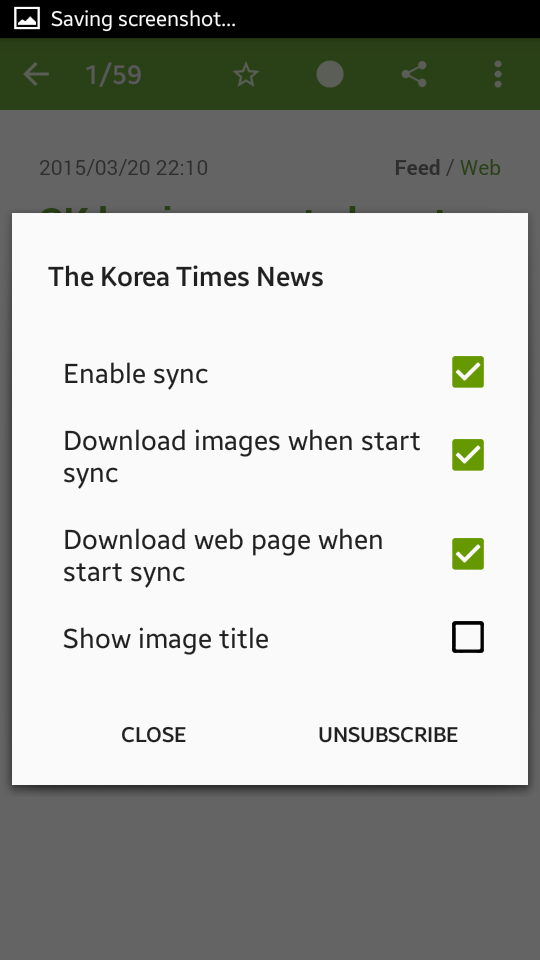
You can toggle between the feed (snippet) and web (full article, mobilizer reading) views manually, on a per-article basis, at the top-right above the headline. To have FeedMe automatically download all such full-article views for a particular site/blog: go to any article in the subscription --> hit the three-button menu icon --> check the third box "Download web page when start sync". Note too that while this particular article has no images, images do sync for offline view as well. 


Even when offline, you can share the content (uses Androids native sharing), send it to Pocket, add Feedly/Inoreader tags to it, or unsubscribe, all of which will sync-up during your next synchronization.


Theres not much to this entry aside from me being a fanboy, I know. I just wanted to demonstrate a simple and reliable solution to a problem that always annoyed me, but that I had assumed was just part of modern Internet life. If, like me, you ever wished for an easy, simple way to regularly read all of your news/blogs offline and full at your convenience, I cannot recommend FeedMe enough. This brilliant little app deserves wider fame. 


FeedMe (Free) | Google Play


Get

Read more »

Friday, August 26, 2016

Google Chrome 51 0 2704 79 Offline Installer 86 bit 64 bit

Google Chrome 51 0 2704 79 Offline Installer 86 bit 64 bit


Chrome adalah peramban web yang cepat, sederhana, dan aman, khusus dibuat untuk web modern. Versi terbaru keluar lagi dari peramban ini, yaitu versi 51.0.2704.79.

Kecepatan
Chrome dirancang agar bekerja secepat mungkin. Dimulai dengan cepat dari desktop Anda, memuat laman web dalam sekejap, dan menjalankan aplikasi web yang rumit secepat kilat.

http://ahsugan.blogspot.com/
Kesederhanaan
Jendela peramban Chrome efektif, bersih, dan sederhana. Misalnya, Anda dapat menelusuri dan bernavigasi dari kotak yang sama dan mengatur tab sesuka Anda -- dengan cepat dan mudah.

Keamanan
Chrome dirancang untuk menjaga Anda agar lebih aman dan terjamin di web dengan perlindungan program jahat dan phishing yang sudah ada di dalamnya, pembaruan otomatis untuk memastikan bahwa Anda memiliki semua pemutakhiran keamanan terbaru, dan yang lainnya.

Privasi
Chrome memberikan Anda kontrol atas informasi pribadi sambil membantu melindungi informasi yang Anda bagikan saat online.

Pengubahsuaian
Ada berbagai macam cara untuk menyesuaikan Chrome dan menjadikannya milik Anda. Mudah untuk menyesuaikan setelan Anda dan menambahkan aplikasi, ekstensi, serta tema dari Toko Web Chrome.

Masuk/Login
Dengan masuk ke Chrome, maka bookmark, riwayat, dan setelan lainnya akan muncul di semua komputer Anda. Anda otomatis masuk ke semua layanan Google favorit juga.

Google Chrome 51.0.2704.79 Offline Installer
versi : x86
size : 43,6 Mb

Google Chrome 51.0.2704.79 Offline Installer
versi : x64
size : 50,2 Mb

Get

Read more »

Wednesday, August 24, 2016

Download Offline Installer Opera 38 Windows Mac Linux

Download Offline Installer Opera 38 Windows Mac Linux


The web browser is by far the most-used application on the computer.  Hours of listening to music, watching videos, or simply having many tabs open drains your battery and reduces your laptop’s performance.
Batter saver in Opera browser extends your laptops battery life to up to 50%
Our new battery saver is today ready in the stable version of Opera for computers, after we tested it the in developer and beta channels.

When we first released the battery saver, we got positive feedback from you. We really appreciate that, and today we would love it if you could help us spread the word about Opera’s new battery saver.

How good is the battery saver in Opera?

Last month, we made several tests to find out how the battery saver performs. In some tests, the feature increased the battery life by as much as 50% comparing to other browsers, such as Google Chrome.
After the initial release in the developer stream, some of you have been asking for more detailed test results. Together with the beta release, we presented a breakdown for the the initial tests as used for the developer release.
Longer battery life for your laptop with battery saver in Opera browser for computers
However we know that video works much better than the thousands of words. That’s why we shot a video showing the full test. Enjoy watching this time-lapse:


Beat the heat during summer

There is one more thing we realized recently. If something consumes more energy, it usually gets warmer – basic physics. That’s why your laptop gets overheated during your heavy browsing sessions. This heats up your lap, sets off a loud and annoying fan, and can cause problems such as random blue screens or even data loss.
We’ve made tests comparing the temperature of the bottoms of two laptops. One was running Opera with battery saver enabled and the other one Opera with the mode disabled. Test results with the new battery saver enabled showed that Opera can keep laptops over 3 degrees (C) cooler. It’s actually pretty nice difference, especially when you think about bringing your laptop along for summer fun and letting it bake your lap.
Battery saver in Opera browser

Improvements under the hood

Wonder how we achieved this cool down and power savings? With several under-the-hood optimizations:
  • Reducing activity in background tabs
  • Waking CPU less often due to optimal scheduling of JavaScript timers
  • Automatically pausing unused plug-ins
  • Reducing frame rate to 30 frames per second
  • Tuning video-playback parameters and forcing usage of hardware accelerated video codecs
  • Pausing animations of browser themes
  • Including ad blocker – when enabled, it enables even more battery savings

How to enable battery savings

Using the new power saver mode is easy. Once the laptop’s power cable is unplugged, the battery icon will appear next to the search and address field in the Opera browser.
Click the battery icon to activate the power saver mode and flip on the switch. The browser will also detect when the laptop’s battery is running low and will suggest enabling power saver mode.
Turn on battery saver in Opera browser for computers

Other new things in Opera 38

Ad blocker – add your own lists. You can add your own block lists. To add your own custom list file, head to Settings and click the “Custom Block Lists” button in the ad-blocking section (note that “Show advanced settings” from the “Browser” panel must be enabled to see the button).

Speed Dial improvements. Now, you don’t need to worry that you removed a website from your Speed Dial accidentally. You’ll now notice three little dots on hover in place of where the delete button used to be. The new button provides quick access to the features previously only available in the context menu, like opening in private tab, or removing a website from your Speed Dial.

Add your own photo as theme. A while back, we introduced the “Create your theme” option in the theme manager. Now, this option is more visible for you. Just go to the Customize start page and click the ‘+’ button; then, use your own photos to create a theme.

Extension button visible in the Speed Dial side panel. All extension users will have the extension manager always at hand. The extension icon is visible on side panel on the left side of the Speed Dial page.

Change in version support for OSX. Starting from this version, we’re updating our requirements on Mac. Now, we’re supporting OS X 10.9 and higher.

We are really happy to bring power saver, as the first major browser, to the stable version. Together with ad blocker and the video pop out, it makes Opera the browser that really responds on today user expectations.
Download the latest Opera for computers, and let us know what you think about it in the comments.


after click linkwait 5 secondsthen click on "SKIP ADin the upper right corner 
(setelah di klik dibawah, Tunggu 5 detik, lalu klik tulisan "SKIP AD" di pojok kanan atas)


DOWNLOAD OPERA 38 FINAL FOR WINDOWS XP, 7, 8, 8.1, & WINDOWS 10

DOWNLOAD OPERA 38 FINAL FOR LINUX


DOWNLOAD OPERA 38 FINAL FOR APPLE MAC OS X

Get

Read more »

Download Google Chrome 52 Offline Installer

Download Google Chrome 52 Offline Installer


Google Chrome is a browser that combines a minimal design with sophisticated technology to make the web faster, safer, and easier. Google Chrome comes with a full range of competitive features, and is among the most standards-compliant and fastest browsers available. Chromes minimalist interface, fast page-load times, and support for extensions make the browser appealing to the average user as well as to Google fanatics.


Google chrome 52 has garnered a lot of fame with many internet users since its launch in 2008. It has so far received a considerable share in global use among the internet browsers. The product upholds a Google sense of innovation, creativity and provides a simple to use, faster browsing for the user. The latest version comes with tabbed browsing, synchronization and privacy functions.  One can synchronize bookmarks, extensions, browser preference to ease access regardless of the computer in use. With the capability of tabbed browsing, one can duplicate tabs, drag and rearrange the tabs in the browser window. The tabs function singularly hence; in case one of them has a problem, the rest is unaffected. Embedding tabs is available in Google chrome hence a new tab originating from the parent will be next not at the end of the tabs list. Some of the factors that make the browser one of the best include security, compatibility, speed and ease of use.


Speed
  • Chrome is designed to be fast in every possible way: Its quick to start up from your desktop, loads web pages in a snap, and runs complex web applications fast .
Simplicity
  • Chromes browser window is streamlined, clean and simple.Chrome also includes features that are designed for efficiency and ease of use. For example, you can search and navigate from the same box, and arrange tabs however you wish quickly and easily.
Security
  • Chrome is designed to keep you safer and more secure on the web with built-in malware and phishing protection, autoupdates to make sure the browser is up-to-date with the latest security updates, and more.
And more features
  • Chrome has many useful features built in, including extensions, translation in the browser, themes, and more.

• Sandboxing.  Every tab in Chrome is sandboxed, so that a tab can display contents of a web page and accept user input, but it will not be able to read the user’s desktop or personal files.
Google say they have “taken the existing process boundary and made it into a jail”. There is an exception to this rule; browser plugins such as Adobe Flash Player do not run within the boundaries of the tab jail, and so users will still be vulnerable to cross-browser exploits based on plugins, until plugins have been updated to work with the new Chrome security. Google has also developed a new phishing blacklist, which will be built into Chrome, as well as made available via a separate public API.

• Privacy. Google announces a so-called incognito mode claiming that it “lets you browse the web in complete privacy because it doesn’t record any of your activity”. No features of this, and no implications of the default mode with respect to Google’s database are given.
• Speed. Speed improvements are a primary design goal.

Stability
• Multiprocessing. The Gears team were considering a multithreaded browser (noting that a problem with existing web browser implementations was that they are inherently single-threaded) and Chrome implemented this concept with a multiprocessing architecture. A separate process is allocated to each task (eg tabs, plugins), as is the case with modern operating systems. This prevents tasks from interfering with each other which is good for both security and stability; an attacker successfully gaining access to one application does not give them access to all and failure in one application results in a “Sad Tab” screen of death. This strategy exacts a fixed per-process cost up front but results in less memory bloat overall as fragmentation is confined to each process and no longer results in further memory allocations. To complement this, Chrome will also feature a process manager which will allow the user to see how much memory and CPU each tab is using, as well as kill unresponsive tabs.

User interface
• Features. Chrome has added some commonly used plugin-specific features of other browsers into the default package, such as an Incognito tab mode, where no logs of the user activity are stored, and all cookies from the session are discarded. As a part of Chrome’s javascript virtual machine, pop-up javascript windows will not be shown by default, and will instead appear as a small bar at the bottom of the interface until the user wishes to display or hide the window. Chrome will include support for web applications running  alongside other local applications on the computer. Tabs can be put in a web-app mode, where the omnibar and controls will be hidden with the goal of allowing the user to use the web-app without the browser “in the  way”.

• Rendering Engine. Chrome uses the WebKit rendering engine on advice from the Gears team because it is simple, memory efficient, useful on embedded devices and easy to learn for new developers.

• Tabs. While all of the major tabbed web browsers (e.g. Internet Explorer, Firefox) have been designed with the window as the primary container, Chrome will put tabs first (similar to Opera). The most immediate way this will show is in the user interface: tabs will be at the top of the window, instead of below the controls, as in the other major tabbed browsers. In Chrome, each tab will be an individual process, and each will have its own browser controls and address bar (dubbed omnibox), a design that adds stability to the browser. If one tab fails only one process dies; the browser can still be used as normal with the exception of the dead tab. Chrome will also implement a New Tab Page which shows the nine most visited pages in thumbnails, along with the most searched on sites, most recently bookmarked sites, and most recently closed tabs, upon opening a new tab, similar to Opera’s “Speed Dial” page.


Whats New On Google Chrome 52  ?

The dev channel has been updated to 52.0.2716.19 for Windows, Mac, and Linux.

A partial list of changes is available in the log. Interested in switching release channels? Find out how. If you find a new issue, please let us know by filing a bug. The community help forum is also a great place to reach out for help or learn about common issues.

Di Mu
Google Chrome


 Download Google Chrome 52 for Windows XP, 7, 8/8.1, Windows 10

Windows 32-bit

Windows 64-bit

 Download Google Chrome 52 for MAC

after click the link above/belowwait 5 secondsthen click on "SKIP ADin the upper right corner
(setelah di klik Tunggu 5 detik, lalu klik tulisan "SKIP AD" di pojok kanan atas)


Get

Read more »

Download Java Runtime Environment JRE 8 Update 101 OFFLINE INSTALLER

Download Java Runtime Environment JRE 8 Update 101 OFFLINE INSTALLER


Java adalah salah satu plug in penting pada browser. Java berfungsi untuk menjalankan javascript yang ada pada halaman web yang dibuka oleh browser. Bagi yang belum mengetahui apakah itu javascript, singkatnya javascript adalah sebuah source code program yang dieksekusi pada komputer client (komputer yang kita pakai untuk browsing) bukan pada komputer server seperti source code PHP. Jadi javascript memerlukan sebuah lingkungan software  java (java runtime environment/JRE) untuk dapat berjalan.


Java allows you to play online games, chat with people around the world, calculate your mortgage interest, and view images in 3D, just to name a few. Its also integral to the intranet applications and other e-business solutions that are the foundation of corporate computing.
  • Provides end-to-end capabilities; the same technology on the client and on the server
  • Delivers a rich user experience across desktop, Web, enterprise, and mobile applications
  • Java expertise readily available in the market; more than 9 million Java developers worldwide
  • Java can be deployed for consumer as well as enterprise applications
  • Java has unmatched security; it protects critical data from theft, loss, and corruption.


 Download Java Runtime Environment 8 Update 101 Windows 32 bit


Download Java Runtime Environment 8 Update 101 Windows 64 bit

OTHER OS (LINUX or MAC)


after click the linkwait 5 secondsthen click on "SKIP ADin the upper right corner
(setelah di klik Tunggu 5 detik, lalu klik tulisan "SKIP AD" di pojok kanan atas)


Get

Read more »

Tuesday, August 23, 2016

ESET Smart Security 8 2015 32 Bit 64 Bit Direct offline installer Download STL

ESET Smart Security 8 2015 32 Bit 64 Bit Direct offline installer Download STL


ESET Smart Security 8 2015 (32-Bit 64-Bit)


Download the offline installer (.msi) below 


Explore the great online with all-in-one Internet security solution. Built around ESET’s legendary 
NOD32 detection technology, it protects against targeted malware and comes with Anti-Theft
to help you track your laptop Pc if it goes missing.


 32-bit Download 


 64-bit Download


If you are facing problem to download this file
Please Click here How to Download


Get

Read more »

Sunday, August 21, 2016

Download Firefox 46 0 1 Offline Installer Windows LiNUX MAC

Download Firefox 46 0 1 Offline Installer Windows LiNUX MAC


Mozilla Firefox 46 is the most popular browser in the World, used by millions of people. It offers great security, privacy, and protection against viruses, spyware, malware, and it can also easily block pop-up windows. The latest version is highly customizable, supports add-ons and extensions, and each browser profile can be configured with different settings.


User Experience
  • The enhancements to Firefox provide the best possible browsing experience on the Web. The new Firefox smart location bar, affectionately known as the "Awesome Bar," learns as people use it, adapting to user preferences and offering better fitting matches over time.
Performance
  • Firefox is built on top of the powerful new Gecko platform, resulting in a safer, easier to use and more personal product.
Security
  • Firefox raises the bar for security. The new malware and phishing protection helps protect from viruses, worms, trojans and spyware to keep people safe on the Web.
Customization
  • Everyone uses the Web differently, and Firefox lets users customize their browser with more than 5,000 add-ons.
  •  


Firefox 46 Final Minimum System Requirements

Windows

Operating Systems
  • Windows XP SP2
  • Windows Server 2003
  • Windows Vista
  • Windows 7
  • Windows 8
  • Windows 8.1
  • Windows 10
Please note that while the 32-bit and 64-bit versions of Windows Vista and Windows 7 can be used to run Firefox 25, only  32-bit builds of Firefox 25 are supported at this time.
Recommended Hardware
  • Pentium 4 or newer processor that supports SSE2
  • 512MB of RAM (1 GB recommended)
  • 200MB of hard drive space

Mac

Operating Systems
  • Mac OS X 10.6
  • Mac OS X 10.7
  • Mac OS X 10.8
  • Mac OS X 10.9
  • Mac OS X 10.10
  • Mac OSX 10.11
Recommended Hardware
  • Macintosh computer with an Intel x86 processor
  • 512 MB of RAM (1 GB or Higher)
  • 200 MB hard drive space

Linux

Software Requirements
Please note that Linux distributors may provide packages for your distribution which have different requirements.
  • Firefox will not run at all without the following libraries or packages:
    • GTK+ 2.18 or higher
    • GLib 2.22 or higher
    • Pango 1.14 or higher
    • X.Org 1.0 or higher (1.7 or higher is recommended)
    • libstdc++ 4.3 or higher
  • For optimal functionality, we recommend the following libraries or packages:
    • NetworkManager 0.7 or higher
    • DBus 1.0 or higher
    • HAL 0.5.8 or higher
    • GNOME 2.16 or higher


Whats New in Firefox 46.0.1 Final Version ?


  • Version 46.0.1, first offered to Release channel users on May 3, 2016

    Wed also like to extend a special thank you to all of the new Mozillians who contributed to this release of Firefox!

    Fixed

    • Page loading issue related to antivirus software (Bug 1268922)
    • Search plugin issue for various locales (Bug 1246494)
    • Add-on signing certificate expiration (Bug 1267318)
    • Service worker update issue (Bug 1267733)
    • Build issue when jit is disabled (Bug 1266366)
    • Limit Sync registration updates (Bug 1262312)

    Reference: Release notes for Firefox 46.0.1
    https://www.mozilla.org/en-US/firefox/46.0.1/releasenotes/


OFFICIAL DOWNLOAD LINK

-


IndonesianBahasa IndonesiaDownload for Windows Download for MacDownload for Linux


English (US)English (US)Download for Windows Download for MacDownload for Linux


Firefox Windows 64 bit
after click the linkwait 5 secondsthen click on "SKIP ADin the upper right corner
(setelah di klik Tunggu 5 detik, lalu klik tulisan "SKIP AD" di pojok kanan atas)

Indonesian (Bahasa)

English (US)


AFTER INSTALL FIREFOX, ALSO Download  

SpeedyFox (Database Optimizer)  
http://www.crystalidea.com/download/speedyfox.exe 


Adblock Plus

http://adf.ly/1OMyBH


 DOWNLOAD FIREFOX 46 FINAL for Android

 http://www.apkreleases.com/wp-content/uploads/2014/09/ff.png

Get

Read more »

Download Firefox 46 FINAL Offline Installer Windows LiNUX MAC

Download Firefox 46 FINAL Offline Installer Windows LiNUX MAC


Mozilla Firefox is the most popular browser in the World, used by millions of people. It offers great security, privacy, and protection against viruses, spyware, malware, and it can also easily block pop-up windows. The latest version is highly customizable, supports add-ons and extensions, and each browser profile can be configured with different settings.


User Experience
  • The enhancements to Firefox provide the best possible browsing experience on the Web. The new Firefox smart location bar, affectionately known as the "Awesome Bar," learns as people use it, adapting to user preferences and offering better fitting matches over time.
Performance
  • Firefox is built on top of the powerful new Gecko platform, resulting in a safer, easier to use and more personal product.
Security
  • Firefox raises the bar for security. The new malware and phishing protection helps protect from viruses, worms, trojans and spyware to keep people safe on the Web.
Customization
  • Everyone uses the Web differently, and Firefox lets users customize their browser with more than 5,000 add-ons.
  •  


Firefox 44 Final Minimum System Requirements

Windows

Operating Systems
  • Windows XP SP2
  • Windows Server 2003
  • Windows Vista
  • Windows 7
  • Windows 8
  • Windows 8.1
  • Windows 10
Please note that while the 32-bit and 64-bit versions of Windows Vista and Windows 7 can be used to run Firefox 25, only  32-bit builds of Firefox 25 are supported at this time.
Recommended Hardware
  • Pentium 4 or newer processor that supports SSE2
  • 512MB of RAM (1 GB recommended)
  • 200MB of hard drive space

Mac

Operating Systems
  • Mac OS X 10.6
  • Mac OS X 10.7
  • Mac OS X 10.8
  • Mac OS X 10.9
  • Mac OS X 10.10
  • Mac OSX 10.11
Recommended Hardware
  • Macintosh computer with an Intel x86 processor
  • 512 MB of RAM (1 GB or Higher)
  • 200 MB hard drive space

Linux

Software Requirements
Please note that Linux distributors may provide packages for your distribution which have different requirements.
  • Firefox will not run at all without the following libraries or packages:
    • GTK+ 2.18 or higher
    • GLib 2.22 or higher
    • Pango 1.14 or higher
    • X.Org 1.0 or higher (1.7 or higher is recommended)
    • libstdc++ 4.3 or higher
  • For optimal functionality, we recommend the following libraries or packages:
    • NetworkManager 0.7 or higher
    • DBus 1.0 or higher
    • HAL 0.5.8 or higher
    • GNOME 2.16 or higher


Whats New in Firefox 46.0 Final Version ?

  • Reference: Release notes for Firefox 46.0
    https://www.mozilla.org/en-US/firefox/46.0/releasenotes/


OFFICIAL DOWNLOAD LINK

-


IndonesianBahasa IndonesiaDownload for Windows Download for MacDownload for Linux

English (US)English (US)Download for Windows Download for MacDownload for Linux


Firefox Windows 64 bit
after click the linkwait 5 secondsthen click on "SKIP ADin the upper right corner
(setelah di klik Tunggu 5 detik, lalu klik tulisan "SKIP AD" di pojok kanan atas)

Indonesian (Bahasa)

English (US)


AFTER INSTALL FIREFOX, ALSO Download  

SpeedyFox (Database Optimizer)  
http://www.crystalidea.com/download/speedyfox.exe 


Adblock Plus

http://adf.ly/1OMyBH


 DOWNLOAD FIREFOX 45 FINAL for Android

 http://www.apkreleases.com/wp-content/uploads/2014/09/ff.png

Get

Read more »

Wednesday, August 17, 2016

Download Firefox 47 Offline Installer Windows LiNUX Apple MAC

Download Firefox 47 Offline Installer Windows LiNUX Apple MAC


Mozilla Firefox 47 is the most popular browser in the World, used by millions of people. It offers great security, privacy, and protection against viruses, spyware, malware, and it can also easily block pop-up windows. The latest version is highly customizable, supports add-ons and extensions, and each browser profile can be configured with different settings.


User Experience
  • The enhancements to Firefox provide the best possible browsing experience on the Web. The new Firefox smart location bar, affectionately known as the "Awesome Bar," learns as people use it, adapting to user preferences and offering better fitting matches over time.
Performance
  • Firefox is built on top of the powerful new Gecko platform, resulting in a safer, easier to use and more personal product.
Security
  • Firefox raises the bar for security. The new malware and phishing protection helps protect from viruses, worms, trojans and spyware to keep people safe on the Web.
Customization
  • Everyone uses the Web differently, and Firefox lets users customize their browser with more than 5,000 add-ons.
  •  


Firefox 47 Final Minimum System Requirements

Windows

Operating Systems
  • Windows XP SP2
  • Windows Server 2003
  • Windows Vista
  • Windows 7
  • Windows 8
  • Windows 8.1
  • Windows 10
Please note that while the 32-bit and 64-bit versions of Windows Vista and Windows 7 can be used to run Firefox 25, only  32-bit builds of Firefox 25 are supported at this time.
Recommended Hardware
  • Pentium 4 or newer processor that supports SSE2
  • 1 GB recommended
  • 200MB of hard drive space

Mac

Operating Systems
  • Mac OS X 10.6
  • Mac OS X 10.7
  • Mac OS X 10.8
  • Mac OS X 10.9
  • Mac OS X 10.10
  • Mac OSX 10.11
Recommended Hardware
  • Macintosh computer with an Intel x86 processor
  • 512 MB of RAM (1 GB or Higher)
  • 200 MB hard drive space

Linux

Software Requirements
Please note that Linux distributors may provide packages for your distribution which have different requirements.
  • Firefox will not run at all without the following libraries or packages:
    • GTK+ 2.18 or higher
    • GLib 2.22 or higher
    • Pango 1.14 or higher
    • X.Org 1.0 or higher (1.7 or higher is recommended)
    • libstdc++ 4.3 or higher
  • For optimal functionality, we recommend the following libraries or packages:
    • NetworkManager 0.7 or higher
    • DBus 1.0 or higher
    • HAL 0.5.8 or higher
    • GNOME 2.16 or higher


Whats New in Firefox 47 Final Version ?


  • New

    • Support for Google’s Widevine CDM on Windows and Mac OS X so streaming services like Amazon Video can switch from Silverlight to encrypted HTML5 video.
    • Enable VP9 video codec for users with fast machines
    • Embedded YouTube videos now play with HTML5 video if Flash is not installed.
    • Allow no-cache on back/forward navigations for https resources
    • Embedded YouTube videos now play with HTML5 video if Flash is not installed

    Changed

    • FUEL (Firefox User Extension Library) has been removed. Add-ons relying on it will stop working.
    • The browser.sessionstore.restore_on_demand preference has been reset to its default value (true) to avoid e10s performance problems. Because faster is better!
    • The Firefox click-to-activate plugin whitelist has been removed.

    Developer

    • View, start,and debug registered Service Workers in the Service Workers developer tool
    • Simulate Push messages in the Service Workers developer tool
    • Tilt is available as extension on AMO
    • See Firefox run! Review Firefox performance data in about:performance.
    • Start button for service workers in about:debugging to start registered Service Workers
    • Changes that can affect add-on compatibility
    • Added support for ChaCha20/Poly1305 cipher suites
    • Custom user agents supported in Responsive Design Mode
    • Smart multi-line input in the Web Console
    Developer Information

    HTML5

    • cuechange events are now available on TextTrack objects
    • WebCrypto: PBKDF2 supports SHA-2 hash algorithms
    • WebCrypto: RSA-PSS signature support


    Fixed

    • Selenium WebDriver may cause Firefox to crash at startup


    Reference: Release notes for Firefox 47.0.1
    https://www.mozilla.org/en-US/firefox/47.0.1/releasenotes/


OFFICIAL DOWNLOAD LINK


IndonesianBahasa IndonesiaDownload for Windows Download for MacDownload for Linux


English (US)English (US)Download for Windows Download for MacDownload for Linux


Firefox for Windows 64 bit
after click the linkwait 5 secondsthen click on "SKIP ADin the upper right corner
(setelah di klik Tunggu 5 detik, lalu klik tulisan "SKIP AD" di pojok kanan atas)

Indonesian (Bahasa)

English (US)


AFTER INSTALL FIREFOX, ALSO Download  

SpeedyFox (Database Optimizer)  
http://www.crystalidea.com/download/speedyfox.exe 


Adblock Plus

http://adf.ly/1OMyBH


 DOWNLOAD FIREFOX 47 FINAL for Android

 http://www.apkreleases.com/wp-content/uploads/2014/09/ff.png

Get

Read more »

Monday, August 15, 2016

Chromium V 53 0 2773 0 Offline Installer

Chromium V 53 0 2773 0 Offline Installer


Chromium adalah proyek peramban web terbuka di mana Google Chrome yang mengambil kodenya. Penjelajah ini berbagi mayoritas kode dan fitur, meskipun ada beberapa perbedaan kecil dalam fitur dan mereka memiliki lisensi yang berbeda. Nah, sepertinya tidak perlu dijelaskan secara panjang lebar mengenai apa itu Chorium, begitu pun dengan perbedaannya dengan Google Chrome. Anda bisa baca selengkapnya di Wikipedia. Bagi yang ingin download mencoba browser satu ini, silahkan, link sudah disediakan.


Download
Chromium V.53.0.2773..0 Offline Installer

Get

Read more »

Saturday, August 13, 2016

Download Google Chrome 53 Offline Installer

Download Google Chrome 53 Offline Installer


Google Chrome is a browser that combines a minimal design with sophisticated technology to make the web faster, safer, and easier. Google Chrome comes with a full range of competitive features, and is among the most standards-compliant and fastest browsers available. Chromes minimalist interface, fast page-load times, and support for extensions make the browser appealing to the average user as well as to Google fanatics.


Google chrome 53 has garnered a lot of fame with many internet users since its launch in 2008. It has so far received a considerable share in global use among the internet browsers. The product upholds a Google sense of innovation, creativity and provides a simple to use, faster browsing for the user. The latest version comes with tabbed browsing, synchronization and privacy functions.  One can synchronize bookmarks, extensions, browser preference to ease access regardless of the computer in use. With the capability of tabbed browsing, one can duplicate tabs, drag and rearrange the tabs in the browser window. The tabs function singularly hence; in case one of them has a problem, the rest is unaffected. Embedding tabs is available in Google chrome hence a new tab originating from the parent will be next not at the end of the tabs list. Some of the factors that make the browser one of the best include security, compatibility, speed and ease of use.


Speed
  • Chrome is designed to be fast in every possible way: Its quick to start up from your desktop, loads web pages in a snap, and runs complex web applications fast .
Simplicity
  • Chromes browser window is streamlined, clean and simple.Chrome also includes features that are designed for efficiency and ease of use. For example, you can search and navigate from the same box, and arrange tabs however you wish quickly and easily.
Security
  • Chrome is designed to keep you safer and more secure on the web with built-in malware and phishing protection, autoupdates to make sure the browser is up-to-date with the latest security updates, and more.
And more features
  • Chrome has many useful features built in, including extensions, translation in the browser, themes, and more.

• Sandboxing.  Every tab in Chrome is sandboxed, so that a tab can display contents of a web page and accept user input, but it will not be able to read the user’s desktop or personal files.
Google say they have “taken the existing process boundary and made it into a jail”. There is an exception to this rule; browser plugins such as Adobe Flash Player do not run within the boundaries of the tab jail, and so users will still be vulnerable to cross-browser exploits based on plugins, until plugins have been updated to work with the new Chrome security. Google has also developed a new phishing blacklist, which will be built into Chrome, as well as made available via a separate public API.

• Privacy. Google announces a so-called incognito mode claiming that it “lets you browse the web in complete privacy because it doesn’t record any of your activity”. No features of this, and no implications of the default mode with respect to Google’s database are given.

• Speed. Speed improvements are a primary design goal.

Stability
• Multiprocessing. The Gears team were considering a multithreaded browser (noting that a problem with existing web browser implementations was that they are inherently single-threaded) and Chrome implemented this concept with a multiprocessing architecture. A separate process is allocated to each task (eg tabs, plugins), as is the case with modern operating systems. This prevents tasks from interfering with each other which is good for both security and stability; an attacker successfully gaining access to one application does not give them access to all and failure in one application results in a “Sad Tab” screen of death. This strategy exacts a fixed per-process cost up front but results in less memory bloat overall as fragmentation is confined to each process and no longer results in further memory allocations. To complement this, Chrome will also feature a process manager which will allow the user to see how much memory and CPU each tab is using, as well as kill unresponsive tabs.

User interface
• Features. Chrome has added some commonly used plugin-specific features of other browsers into the default package, such as an Incognito tab mode, where no logs of the user activity are stored, and all cookies from the session are discarded. As a part of Chrome’s javascript virtual machine, pop-up javascript windows will not be shown by default, and will instead appear as a small bar at the bottom of the interface until the user wishes to display or hide the window. Chrome will include support for web applications running  alongside other local applications on the computer. Tabs can be put in a web-app mode, where the omnibar and controls will be hidden with the goal of allowing the user to use the web-app without the browser “in the  way”.

• Rendering Engine. Chrome uses the WebKit rendering engine on advice from the Gears team because it is simple, memory efficient, useful on embedded devices and easy to learn for new developers.

• Tabs. While all of the major tabbed web browsers (e.g. Internet Explorer, Firefox) have been designed with the window as the primary container, Chrome will put tabs first (similar to Opera). The most immediate way this will show is in the user interface: tabs will be at the top of the window, instead of below the controls, as in the other major tabbed browsers. In Chrome, each tab will be an individual process, and each will have its own browser controls and address bar (dubbed omnibox), a design that adds stability to the browser. If one tab fails only one process dies; the browser can still be used as normal with the exception of the dead tab. Chrome will also implement a New Tab Page which shows the nine most visited pages in thumbnails, along with the most searched on sites, most recently bookmarked sites, and most recently closed tabs, upon opening a new tab, similar to Opera’s “Speed Dial” page.


Whats New On Google Chrome 53  ?

The Dev channel has been updated to 53.0.2785.23 (Platform version: 8530.24.0) for all Chrome OS devices. This build contains a number of bug fixes, security updates and feature enhancements. A list of changes can be found here.

If you find new issues, please let us know by visiting our forum or filing a bug. Interested in switching channels? Find out how. You can submit feedback using ‘Report an issue...’ in the Chrome menu (3 vertical dots in the upper right corner of the browser).

Ketaki Deshpande
Google Chrome


 Download Google Chrome 53 for Windows XP, 7, 8/8.1, Windows 10


 Download Google Chrome 53 for MAC

after click the link above/belowwait 5 secondsthen click on "SKIP ADin the upper right corner
(setelah di klik Tunggu 5 detik, lalu klik tulisan "SKIP AD" di pojok kanan atas)

Get

Read more »