Showing posts with label chrome. Show all posts

Sunday, August 28, 2016

Chrome to Phone replacement for FoxtoPhone users Sendroid

Chrome to Phone replacement for FoxtoPhone users Sendroid


I was very annoyed this week to discover that Google has depreciated their useful little "Chrome to Phone" extension. This was a simple tool to send links from your desktop browser to your Android phone with one click. I personally prefer Firefox over Chrome, but there was no problem thanks to the useful FoxtoPhone add-on for Firefox that sent links from Firefox to your phone through the Chrome-to-Phone app. 

DEPRECIATED 


So I was annoyed to see a huge "[DEPRECIATED]" notice in the title of the "Chrome to Phone" Android app. It now runs this message in both the Android apps Play Store page and the corresponding Chrome extensions page. 

NOTICE: Chrome to Phone is no longer supported
Chrome to Phone was launched in 2010 to help bridge your desktop and phone experience by making it easy to send Web links to your phone. Over the years, Google’s core products have evolved to be more integrated across different form factors. As of today, Chrome to Phone is deprecated. The app will continue to work until Mar 31st 2016 after which it will no longer work.

Based on the comments section for the Chrome extension, Im not the only annoyed person out there. Google is really becoming the new Apple. I abandoned Apple precisely for its tight-fisted walled-garden approach. Anyway, their recommendation for replacement (Chrome tab sync) are utterly useless for me, a Firefox user (though lets be honest, anything that steals even more marketshare is music to their ears). Firefox also has a tab-sync feature; the trouble is I prefer Firefox on desktop and Chrome on Android. Until now, the Chrome-to-Phone/FoxtoPhone combo meant they both played nice.

Sendroid


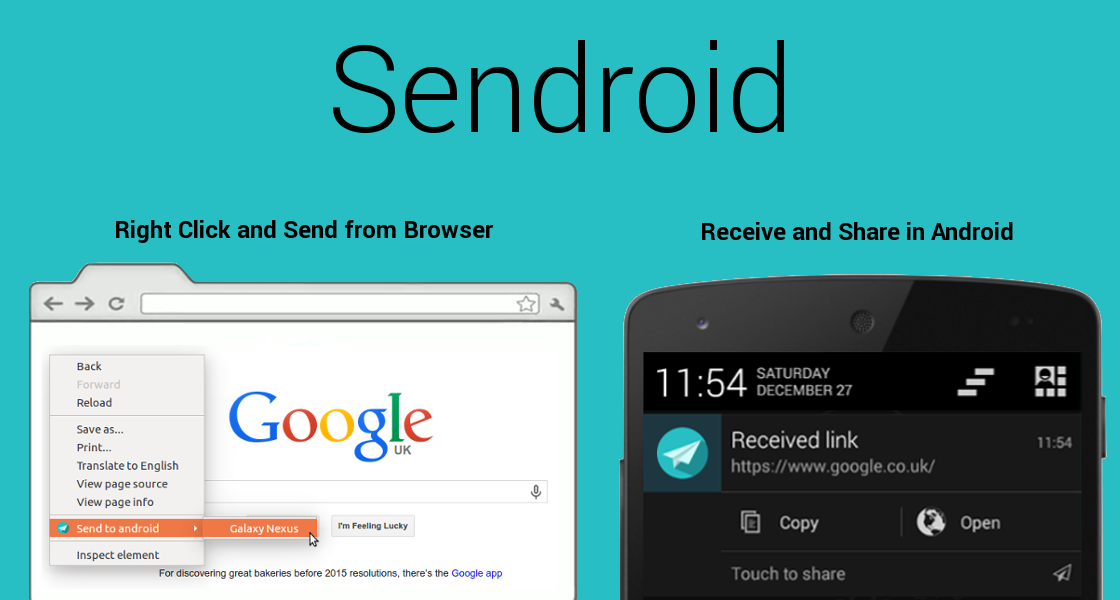
But hope is not all lost. In my search for a replacement, I came across a little Firefox Add-on called Sendroid that does basically the same thing, with a partner light-weight Android app. Ive been trying it out, and heres a review of what I think:

PRO:

  • Image auto-download. This is a cool feature Chrome2Phone was missing. Right-clicking images in Firefox now allows me to send that image, not just the link, to my Android (well, the link gets sent, but then automatically downloaded on my phone).
  • Android share menu. I would always receive links via Chrome2Phone on Android, but not necessary want to launch them (I mean obviously I was on that page seconds before on desktop). If I sent a link to my phone, its usually because I intended to send it, either to Keep or to a KakaoTalk chat-room. Sendroid automatically gives me that ability without having to swipe away the notification and open the app (as I had to do with Chrome2Phone)
  • No log-in. Obviously FoxtoPhone needed access to my Google account to send via the Chrome2Phone protocol. Sendroid just uses a unique registration code your phone generates when first installing. Just copy the code to the Firefox extension once, and youre set.
  • Multiple receivers. This is a biggie. I usually used Fox2Phone to send links to my Android, which Id then send to a friend on Kakao. Sendroid cuts out the middle-man: if he/she also has the light Sendroid app, I can send it right to them directly. 

CON:

  • No history. Chrome2Phone would save a list of all the links/text it had received. Good for links I sent, swiped away, then wanted to consult later. Sendroid has no such history.
  • No link launching. This is a bit annoying. Sometimes when I send a link, I do want to launch it in the Android browser. There seems no option for this: you share the link to an installed app. Thats it. And neither mobile Chrome nor the stock browser are in the Android share menu. 
    EDIT: I was mistaken. When the notification shade is filled with lots of other items, the Sendroid notification contracts to a smaller size, like do many other notifications, which allows only for a single tap, which opens the Share menu. However if your notification shade is basically empty, it will expand to allow either sharing, copying the link, or launching the link. Here are the two states of the notification you receive:


For now until that March 31st deadline, Ill continue to use Fox2Phone alongside Sendroid. Who knows, maybe the FoxtoPhone developer will come-up with a workaround. I do find it a bit weird that Sendoid has so few users (12 reviews on Google Play, 100~500 installs, 37 users on Chrome, 62 users on Firefox as of today) but I will chalk it up to "Chrome to Phone" having been an official Google-branded product. I wouldnt have even thought of trying Sendroid either, until now anyway.

I do wonder how much longer the Blogger service will up and running. Every time I log-in to this blog, I hold my breath in fear of a giant "DEPRECIATED" across the screen. Google, I want to love you, I want to use your services, but you make it hard to love you. Dont send me into the arms of Wordpress 

? Sendroid Firefox Add-on
? Sendroid extension at Chrome Web Store
? Sendroid Android app on Google Play


Get

Read more »

Friday, August 26, 2016

Google Chrome 51 0 2704 79 Offline Installer 86 bit 64 bit

Google Chrome 51 0 2704 79 Offline Installer 86 bit 64 bit


Chrome adalah peramban web yang cepat, sederhana, dan aman, khusus dibuat untuk web modern. Versi terbaru keluar lagi dari peramban ini, yaitu versi 51.0.2704.79.

Kecepatan
Chrome dirancang agar bekerja secepat mungkin. Dimulai dengan cepat dari desktop Anda, memuat laman web dalam sekejap, dan menjalankan aplikasi web yang rumit secepat kilat.

http://ahsugan.blogspot.com/
Kesederhanaan
Jendela peramban Chrome efektif, bersih, dan sederhana. Misalnya, Anda dapat menelusuri dan bernavigasi dari kotak yang sama dan mengatur tab sesuka Anda -- dengan cepat dan mudah.

Keamanan
Chrome dirancang untuk menjaga Anda agar lebih aman dan terjamin di web dengan perlindungan program jahat dan phishing yang sudah ada di dalamnya, pembaruan otomatis untuk memastikan bahwa Anda memiliki semua pemutakhiran keamanan terbaru, dan yang lainnya.

Privasi
Chrome memberikan Anda kontrol atas informasi pribadi sambil membantu melindungi informasi yang Anda bagikan saat online.

Pengubahsuaian
Ada berbagai macam cara untuk menyesuaikan Chrome dan menjadikannya milik Anda. Mudah untuk menyesuaikan setelan Anda dan menambahkan aplikasi, ekstensi, serta tema dari Toko Web Chrome.

Masuk/Login
Dengan masuk ke Chrome, maka bookmark, riwayat, dan setelan lainnya akan muncul di semua komputer Anda. Anda otomatis masuk ke semua layanan Google favorit juga.

Google Chrome 51.0.2704.79 Offline Installer
versi : x86
size : 43,6 Mb

Google Chrome 51.0.2704.79 Offline Installer
versi : x64
size : 50,2 Mb

Get

Read more »

Wednesday, August 24, 2016

Download Google Chrome 52 Offline Installer

Download Google Chrome 52 Offline Installer


Google Chrome is a browser that combines a minimal design with sophisticated technology to make the web faster, safer, and easier. Google Chrome comes with a full range of competitive features, and is among the most standards-compliant and fastest browsers available. Chromes minimalist interface, fast page-load times, and support for extensions make the browser appealing to the average user as well as to Google fanatics.


Google chrome 52 has garnered a lot of fame with many internet users since its launch in 2008. It has so far received a considerable share in global use among the internet browsers. The product upholds a Google sense of innovation, creativity and provides a simple to use, faster browsing for the user. The latest version comes with tabbed browsing, synchronization and privacy functions.  One can synchronize bookmarks, extensions, browser preference to ease access regardless of the computer in use. With the capability of tabbed browsing, one can duplicate tabs, drag and rearrange the tabs in the browser window. The tabs function singularly hence; in case one of them has a problem, the rest is unaffected. Embedding tabs is available in Google chrome hence a new tab originating from the parent will be next not at the end of the tabs list. Some of the factors that make the browser one of the best include security, compatibility, speed and ease of use.


Speed
  • Chrome is designed to be fast in every possible way: Its quick to start up from your desktop, loads web pages in a snap, and runs complex web applications fast .
Simplicity
  • Chromes browser window is streamlined, clean and simple.Chrome also includes features that are designed for efficiency and ease of use. For example, you can search and navigate from the same box, and arrange tabs however you wish quickly and easily.
Security
  • Chrome is designed to keep you safer and more secure on the web with built-in malware and phishing protection, autoupdates to make sure the browser is up-to-date with the latest security updates, and more.
And more features
  • Chrome has many useful features built in, including extensions, translation in the browser, themes, and more.

• Sandboxing.  Every tab in Chrome is sandboxed, so that a tab can display contents of a web page and accept user input, but it will not be able to read the user’s desktop or personal files.
Google say they have “taken the existing process boundary and made it into a jail”. There is an exception to this rule; browser plugins such as Adobe Flash Player do not run within the boundaries of the tab jail, and so users will still be vulnerable to cross-browser exploits based on plugins, until plugins have been updated to work with the new Chrome security. Google has also developed a new phishing blacklist, which will be built into Chrome, as well as made available via a separate public API.

• Privacy. Google announces a so-called incognito mode claiming that it “lets you browse the web in complete privacy because it doesn’t record any of your activity”. No features of this, and no implications of the default mode with respect to Google’s database are given.
• Speed. Speed improvements are a primary design goal.

Stability
• Multiprocessing. The Gears team were considering a multithreaded browser (noting that a problem with existing web browser implementations was that they are inherently single-threaded) and Chrome implemented this concept with a multiprocessing architecture. A separate process is allocated to each task (eg tabs, plugins), as is the case with modern operating systems. This prevents tasks from interfering with each other which is good for both security and stability; an attacker successfully gaining access to one application does not give them access to all and failure in one application results in a “Sad Tab” screen of death. This strategy exacts a fixed per-process cost up front but results in less memory bloat overall as fragmentation is confined to each process and no longer results in further memory allocations. To complement this, Chrome will also feature a process manager which will allow the user to see how much memory and CPU each tab is using, as well as kill unresponsive tabs.

User interface
• Features. Chrome has added some commonly used plugin-specific features of other browsers into the default package, such as an Incognito tab mode, where no logs of the user activity are stored, and all cookies from the session are discarded. As a part of Chrome’s javascript virtual machine, pop-up javascript windows will not be shown by default, and will instead appear as a small bar at the bottom of the interface until the user wishes to display or hide the window. Chrome will include support for web applications running  alongside other local applications on the computer. Tabs can be put in a web-app mode, where the omnibar and controls will be hidden with the goal of allowing the user to use the web-app without the browser “in the  way”.

• Rendering Engine. Chrome uses the WebKit rendering engine on advice from the Gears team because it is simple, memory efficient, useful on embedded devices and easy to learn for new developers.

• Tabs. While all of the major tabbed web browsers (e.g. Internet Explorer, Firefox) have been designed with the window as the primary container, Chrome will put tabs first (similar to Opera). The most immediate way this will show is in the user interface: tabs will be at the top of the window, instead of below the controls, as in the other major tabbed browsers. In Chrome, each tab will be an individual process, and each will have its own browser controls and address bar (dubbed omnibox), a design that adds stability to the browser. If one tab fails only one process dies; the browser can still be used as normal with the exception of the dead tab. Chrome will also implement a New Tab Page which shows the nine most visited pages in thumbnails, along with the most searched on sites, most recently bookmarked sites, and most recently closed tabs, upon opening a new tab, similar to Opera’s “Speed Dial” page.


Whats New On Google Chrome 52  ?

The dev channel has been updated to 52.0.2716.19 for Windows, Mac, and Linux.

A partial list of changes is available in the log. Interested in switching release channels? Find out how. If you find a new issue, please let us know by filing a bug. The community help forum is also a great place to reach out for help or learn about common issues.

Di Mu
Google Chrome


 Download Google Chrome 52 for Windows XP, 7, 8/8.1, Windows 10

Windows 32-bit

Windows 64-bit

 Download Google Chrome 52 for MAC

after click the link above/belowwait 5 secondsthen click on "SKIP ADin the upper right corner
(setelah di klik Tunggu 5 detik, lalu klik tulisan "SKIP AD" di pojok kanan atas)


Get
Read more »

Saturday, August 13, 2016

Download Google Chrome 53 Offline Installer

Download Google Chrome 53 Offline Installer


Google Chrome is a browser that combines a minimal design with sophisticated technology to make the web faster, safer, and easier. Google Chrome comes with a full range of competitive features, and is among the most standards-compliant and fastest browsers available. Chromes minimalist interface, fast page-load times, and support for extensions make the browser appealing to the average user as well as to Google fanatics.


Google chrome 53 has garnered a lot of fame with many internet users since its launch in 2008. It has so far received a considerable share in global use among the internet browsers. The product upholds a Google sense of innovation, creativity and provides a simple to use, faster browsing for the user. The latest version comes with tabbed browsing, synchronization and privacy functions.  One can synchronize bookmarks, extensions, browser preference to ease access regardless of the computer in use. With the capability of tabbed browsing, one can duplicate tabs, drag and rearrange the tabs in the browser window. The tabs function singularly hence; in case one of them has a problem, the rest is unaffected. Embedding tabs is available in Google chrome hence a new tab originating from the parent will be next not at the end of the tabs list. Some of the factors that make the browser one of the best include security, compatibility, speed and ease of use.


Speed
  • Chrome is designed to be fast in every possible way: Its quick to start up from your desktop, loads web pages in a snap, and runs complex web applications fast .
Simplicity
  • Chromes browser window is streamlined, clean and simple.Chrome also includes features that are designed for efficiency and ease of use. For example, you can search and navigate from the same box, and arrange tabs however you wish quickly and easily.
Security
  • Chrome is designed to keep you safer and more secure on the web with built-in malware and phishing protection, autoupdates to make sure the browser is up-to-date with the latest security updates, and more.
And more features
  • Chrome has many useful features built in, including extensions, translation in the browser, themes, and more.

• Sandboxing.  Every tab in Chrome is sandboxed, so that a tab can display contents of a web page and accept user input, but it will not be able to read the user’s desktop or personal files.
Google say they have “taken the existing process boundary and made it into a jail”. There is an exception to this rule; browser plugins such as Adobe Flash Player do not run within the boundaries of the tab jail, and so users will still be vulnerable to cross-browser exploits based on plugins, until plugins have been updated to work with the new Chrome security. Google has also developed a new phishing blacklist, which will be built into Chrome, as well as made available via a separate public API.

• Privacy. Google announces a so-called incognito mode claiming that it “lets you browse the web in complete privacy because it doesn’t record any of your activity”. No features of this, and no implications of the default mode with respect to Google’s database are given.

• Speed. Speed improvements are a primary design goal.

Stability
• Multiprocessing. The Gears team were considering a multithreaded browser (noting that a problem with existing web browser implementations was that they are inherently single-threaded) and Chrome implemented this concept with a multiprocessing architecture. A separate process is allocated to each task (eg tabs, plugins), as is the case with modern operating systems. This prevents tasks from interfering with each other which is good for both security and stability; an attacker successfully gaining access to one application does not give them access to all and failure in one application results in a “Sad Tab” screen of death. This strategy exacts a fixed per-process cost up front but results in less memory bloat overall as fragmentation is confined to each process and no longer results in further memory allocations. To complement this, Chrome will also feature a process manager which will allow the user to see how much memory and CPU each tab is using, as well as kill unresponsive tabs.

User interface
• Features. Chrome has added some commonly used plugin-specific features of other browsers into the default package, such as an Incognito tab mode, where no logs of the user activity are stored, and all cookies from the session are discarded. As a part of Chrome’s javascript virtual machine, pop-up javascript windows will not be shown by default, and will instead appear as a small bar at the bottom of the interface until the user wishes to display or hide the window. Chrome will include support for web applications running  alongside other local applications on the computer. Tabs can be put in a web-app mode, where the omnibar and controls will be hidden with the goal of allowing the user to use the web-app without the browser “in the  way”.

• Rendering Engine. Chrome uses the WebKit rendering engine on advice from the Gears team because it is simple, memory efficient, useful on embedded devices and easy to learn for new developers.

• Tabs. While all of the major tabbed web browsers (e.g. Internet Explorer, Firefox) have been designed with the window as the primary container, Chrome will put tabs first (similar to Opera). The most immediate way this will show is in the user interface: tabs will be at the top of the window, instead of below the controls, as in the other major tabbed browsers. In Chrome, each tab will be an individual process, and each will have its own browser controls and address bar (dubbed omnibox), a design that adds stability to the browser. If one tab fails only one process dies; the browser can still be used as normal with the exception of the dead tab. Chrome will also implement a New Tab Page which shows the nine most visited pages in thumbnails, along with the most searched on sites, most recently bookmarked sites, and most recently closed tabs, upon opening a new tab, similar to Opera’s “Speed Dial” page.


Whats New On Google Chrome 53  ?

The Dev channel has been updated to 53.0.2785.23 (Platform version: 8530.24.0) for all Chrome OS devices. This build contains a number of bug fixes, security updates and feature enhancements. A list of changes can be found here.

If you find new issues, please let us know by visiting our forum or filing a bug. Interested in switching channels? Find out how. You can submit feedback using ‘Report an issue...’ in the Chrome menu (3 vertical dots in the upper right corner of the browser).

Ketaki Deshpande
Google Chrome


 Download Google Chrome 53 for Windows XP, 7, 8/8.1, Windows 10


 Download Google Chrome 53 for MAC

after click the link above/belowwait 5 secondsthen click on "SKIP ADin the upper right corner
(setelah di klik Tunggu 5 detik, lalu klik tulisan "SKIP AD" di pojok kanan atas)

Get

Read more »

Monday, August 8, 2016

Google Chrome 48 0 2564 82 Stable Offline Installer 86 bit 64 bit

Google Chrome 48 0 2564 82 Stable Offline Installer 86 bit 64 bit


http://www.googleadservices.com/pagead/aclk?sa=L&ai=CWgN9-RfzVa68IcmSvgT43YLADef_-6AHn730m_8B2tkeEAEgyMewKmDpgoCA5A2gAbnDutUDyAECqAMByAPBBKoEswFP0InQI1q1uNXAXM5OXvc43jFBKKbv7nC5GL0GDKZx5C3QdqcqO_ZXvNvoLIprBh1VhjHBVEksrFsBB4XEJiYQWD_5XwgwVXeXsadOEi487_wNv0hiCJ_9LVCLP6GVAUJy9eZeRJi2qkvZA-4FN9bColBTIr1H0c4gwsS5aRC5alz-gqUnhPJZ4Zfmr-nQdiqBtikt8popgmRYVD3WQH889yOQOcptSvAHmG7hNxOdRxN8U4gGAaAGAoAHr7zFKqgHpr4b2AcB&num=1&cid=5GjlPFAOV9xSagJ9B2iNag7u&sig=AOD64_3eviuIdvzXC3MtbdnU4L5JBIysvg&client=ca-pub-9561911387365081&adurl=https://www.blibli.com/brand/ovomaltine&nm=2&mb=2&bg=!NzRERpuMxjihVG0CAAAAdlIAAAAwKgEBqg64s9cphEB8FGV7VcXq3PuOUx3dB2dDZYWS09JhUi5jdjVKdKW4oevVi0VvCooKeyisPiujptO8U5fQQszqh7yv8Cqruidezcv2Y-iizA5_ZDSa3STbVjUCAe7xLtN8RHoXSCUmZZ7h20_gGWkfRT4t8AUl84CMJdxbEsh6o437TSjeFIx_sLrTBL_rc0FfHKt4hUkn1TI-pzc7dkSUk6Hr9EiEg3pm3AuQeh_Tnb-c4Lv8KmCDBjmI3r_MEe4O0tJxM12RWFX4rlkN1-Fm17rbK-skGMDvaPL3qHh5tZcwrIVNrdmtSfwPHPPVbzwFTdUz2yE0X5VdrJ-aIbBeP_Y
Chrome adalah peramban web yang cepat, sederhana, dan aman, khusus dibuat untuk web modern.

Kecepatan
Chrome dirancang agar bekerja secepat mungkin. Dimulai dengan cepat dari desktop Anda, memuat laman web dalam sekejap, dan menjalankan aplikasi web yang rumit secepat kilat.

Kesederhanaan
Jendela peramban Chrome efektif, bersih, dan sederhana. Misalnya, Anda dapat menelusuri dan bernavigasi dari kotak yang sama dan mengatur tab sesuka Anda -- dengan cepat dan mudah.

Keamanan
Chrome dirancang untuk menjaga Anda agar lebih aman dan terjamin di web dengan perlindungan program jahat dan phishing yang sudah ada di dalamnya, pembaruan otomatis untuk memastikan bahwa Anda memiliki semua pemutakhiran keamanan terbaru, dan yang lainnya.

Privasi
Chrome memberikan Anda kontrol atas informasi pribadi sambil membantu melindungi informasi yang Anda bagikan saat online.

Pengubahsuaian
Ada berbagai macam cara untuk menyesuaikan Chrome dan menjadikannya milik Anda. Mudah untuk menyesuaikan setelan Anda dan menambahkan aplikasi, ekstensi, serta tema dari Toko Web Chrome.

Masuk/Login
Dengan masuk ke Chrome, maka bookmark, riwayat, dan setelan lainnya akan muncul di semua komputer Anda. Anda otomatis masuk ke semua layanan Google favorit juga.


Google Chrome 48.0.2564.82 Stable Offline Installer
Versi : x86
Size : 42 Mb


Google Chrome 48.0.2564.82 Stable Offline Installer
Versi : x64
Size : 42 Mb

Versi baru 51.0.2704.79
Chrome 51.0.2704.79 Offline Installer 86-bit/64-bit

Get

Read more »

Download Google Chrome Offline Installer Version 30 0 2171 99 Free

Download Google Chrome Offline Installer Version 30 0 2171 99 Free


Review And Download Google Chrome Offline Installer Version 30.0.2171.99 Free 

Google Chrome is a free web browser by Google with many new features. Available version offline installer for easy installation without an internet connection. Google Chrome browsers popular among similar and as based on open source, Google Chrome is increasingly in demand each user to be modified. Googles Chrome browser has a feature that is very much like an extension, Incognito mode, boomarks, omni box and others. (See to: Download Microsoft Office Professional Plus 2013)
Review And Download Google Chrome Offline Installer Version 30.0.2171.99 Free
Google Chrome
The security level of this browser is very good, it was noted that the current Google Chrome browser topped with most good security and privacy. (See to: Download Free GOM Player For Windows)

Display Google Chrome itself is fairly simple, minimalist and clean but fast and efficient memory usage. But for some recent version of Google Chrome is more focused online installer. You can download google chrome offline installer on this website and explore the world of the Internet with a browser that is light, fast, and direct from Google on your PC. (See to: Reduce Your Photo With JPEGmini, Download Free)

Features Chrome 30.0.2171.99

What new features in Chrome at this version, check in:
  • Fixed bugs
  • New security and privacy
  • Extension
  • Incognito mode
  • Boomarks
  • Omni box
  • And Other...

Link Download

You can download Google Chrome Offline Installer Version 30.0.2171.99 at this website. Download, its free and easy.

File Information

  • Developer: Google
  • File name: Chrome-39.0.exe
  • File size: 40MB
  • License: Open source
  • Version: 30.0.2171.99

How To Install

To install Google Chrome Browser in your Computer, following steps bellow:
  • Download Google Chrome at link above
  • Open .exe file at your specific download location
  • Double click .exe file to start instalation
  • Waiting a minutes to finishing instalation
  • Done

Get

Read more »

Monday, August 1, 2016

Google Chrome 50 Adalah Rilis Terakhir Untuk Windows XP Vista MAC OS X10 6 OS X 10 7 DAN OS X 10 8

Google Chrome 50 Adalah Rilis Terakhir Untuk Windows XP Vista MAC OS X10 6 OS X 10 7 DAN OS X 10 8


Google mengumumkan bahwa mereka akan menurunkan dukungan browser Chrome versi desktop untuk sistem operasi lama dari Windows dan juga OS X.

Para pengguna sistem operasi seperti Windows XP, Vista, OS X 10.6, 10.7, dan 10.8 ini nantinya tidak akan lagi bisa menerima pembaruan terbaru dari Chrome. Artinya, mereka juga tidak akan mendapatkan pembaruan keamanan yang terdapat dalam Chrome versi baru.

Penghentian ini disebabkan karena sistem operasi sudah tidak lagi didukung secara resmi oleh Apple dan Microsoft. Meski demikian, para pengguna sistem operasi ini masih tetap bisa berselancar di dunia maya menggunakan Chrome versi lama.

Penghentian pembaruan ini akan resmi dimulai pada April 2016 mendatang. Jadi, jika tidak ingin memiliki risiko keamanan saat browsing, sebaiknya pengguna meng-update sistem operasinya ke versi yang lebih baru.

If youre still using one of these operating systems, you have a couple of options. One is to upgrade to a newer OS, assuming your hardware can handle it. Security patches for Windows XP stopped in April of 2014, and patches for OS X 10.6 stopped a few months before that. Updates for OS X 10.7 and 10.8 ended roughly when versions 10.10 and 10.11 were released, respectively, since Apples unofficial policy is to provide security fixes for the most recent OS X release and the two previous releases. Windows Vista is still getting bare-minimum security patches from Microsoft, but that ends in April of 2017.
Your second option is to switch browsers, some of which still support these legacy operating systems. Firefox 45 still runs on Windows XP and OS X 10.6, while the latest version of Opera should still run on XP and OS X 10.7 and above. Running an up-to-date browser cant protect you from vulnerabilities in the underlying OS, but if you absolutely cant (or wont) upgrade and you still want an actively supported browser, you still have a couple of options for now.

Get

Read more »

Saturday, July 30, 2016

Google Chrome offline installer Windows

Google Chrome offline installer Windows


 Google Chrome Free Download 


Get a fast, free web browser
One browser for your computer, phone and tablet


Download (32-Bit) offline installer

Download (64-Bit) offline installer


Get

Read more »