Showing posts with label users. Show all posts
Showing posts with label users. Show all posts
Sunday, August 28, 2016
Chrome to Phone replacement for FoxtoPhone users Sendroid
Chrome to Phone replacement for FoxtoPhone users Sendroid
I was very annoyed this week to discover that Google has depreciated their useful little "Chrome to Phone" extension. This was a simple tool to send links from your desktop browser to your Android phone with one click. I personally prefer Firefox over Chrome, but there was no problem thanks to the useful FoxtoPhone add-on for Firefox that sent links from Firefox to your phone through the Chrome-to-Phone app.
 DEPRECIATED
So I was annoyed to see a huge "[DEPRECIATED]" notice in the title of the "Chrome to Phone" Android app. It now runs this message in both the Android apps Play Store page and the corresponding Chrome extensions page.
NOTICE: Chrome to Phone is no longer supported
Chrome to Phone was launched in 2010 to help bridge your desktop and phone experience by making it easy to send Web links to your phone. Over the years, Google’s core products have evolved to be more integrated across different form factors. As of today, Chrome to Phone is deprecated. The app will continue to work until Mar 31st 2016 after which it will no longer work.
Based on the comments section for the Chrome extension, Im not the only annoyed person out there. Google is really becoming the new Apple. I abandoned Apple precisely for its tight-fisted walled-garden approach. Anyway, their recommendation for replacement (Chrome tab sync) are utterly useless for me, a Firefox user (though lets be honest, anything that steals even more marketshare is music to their ears). Firefox also has a tab-sync feature; the trouble is I prefer Firefox on desktop and Chrome on Android. Until now, the Chrome-to-Phone/FoxtoPhone combo meant they both played nice.
Sendroid
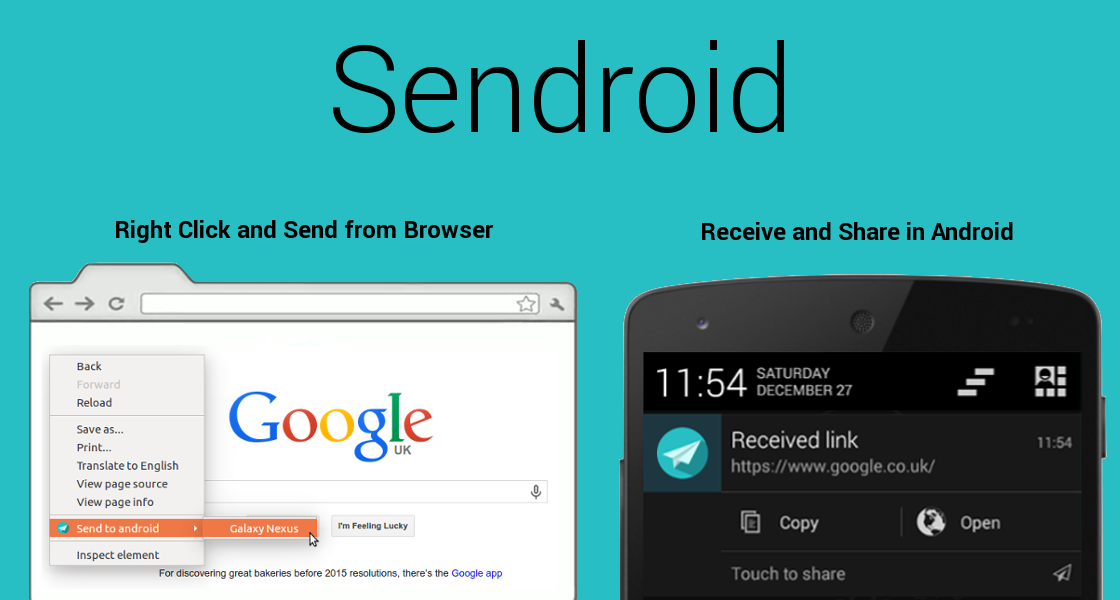
But hope is not all lost. In my search for a replacement, I came across a little Firefox Add-on called Sendroid that does basically the same thing, with a partner light-weight Android app. Ive been trying it out, and heres a review of what I think:
PRO:
- Image auto-download. This is a cool feature Chrome2Phone was missing. Right-clicking images in Firefox now allows me to send that image, not just the link, to my Android (well, the link gets sent, but then automatically downloaded on my phone).
- Android share menu. I would always receive links via Chrome2Phone on Android, but not necessary want to launch them (I mean obviously I was on that page seconds before on desktop). If I sent a link to my phone, its usually because I intended to send it, either to Keep or to a KakaoTalk chat-room. Sendroid automatically gives me that ability without having to swipe away the notification and open the app (as I had to do with Chrome2Phone)
- No log-in. Obviously FoxtoPhone needed access to my Google account to send via the Chrome2Phone protocol. Sendroid just uses a unique registration code your phone generates when first installing. Just copy the code to the Firefox extension once, and youre set.
- Multiple receivers. This is a biggie. I usually used Fox2Phone to send links to my Android, which Id then send to a friend on Kakao. Sendroid cuts out the middle-man: if he/she also has the light Sendroid app, I can send it right to them directly.
CON:
- No history. Chrome2Phone would save a list of all the links/text it had received. Good for links I sent, swiped away, then wanted to consult later. Sendroid has no such history.
No link launching. This is a bit annoying. Sometimes when I send a link, I do want to launch it in the Android browser. There seems no option for this: you share the link to an installed app. Thats it. And neither mobile Chrome nor the stock browser are in the Android share menu.
EDIT: I was mistaken. When the notification shade is filled with lots of other items, the Sendroid notification contracts to a smaller size, like do many other notifications, which allows only for a single tap, which opens the Share menu. However if your notification shade is basically empty, it will expand to allow either sharing, copying the link, or launching the link. Here are the two states of the notification you receive:

For now until that March 31st deadline, Ill continue to use Fox2Phone alongside Sendroid. Who knows, maybe the FoxtoPhone developer will come-up with a workaround. I do find it a bit weird that Sendoid has so few users (12 reviews on Google Play, 100~500 installs, 37 users on Chrome, 62 users on Firefox as of today) but I will chalk it up to "Chrome to Phone" having been an official Google-branded product. I wouldnt have even thought of trying Sendroid either, until now anyway.
I do wonder how much longer the Blogger service will up and running. Every time I log-in to this blog, I hold my breath in fear of a giant "DEPRECIATED" across the screen. Google, I want to love you, I want to use your services, but you make it hard to love you. Dont send me into the arms of Wordpress
? Sendroid Firefox Add-on
? Sendroid extension at Chrome Web Store
? Sendroid Android app on Google Play

Sunday, August 21, 2016
Arduino Meets Linux The Users Guide to Arduino Yún Development
Arduino Meets Linux The Users Guide to Arduino Yún Development


The Yún is one of the most powerful and flexible hardware development boards in the Arduino range. It combines the ease-of-use of the Arduino platform, with the power of a 400 MHz Atheros AR9331 Wi-Fi system-on-chip (WiSOC) that runs Linux.
But if you are not experienced and confident in working with Linux-based operating systems, it may be difficult for you to use the Yún to its full potential.
Bob Hammell is the author of popular Arduino learning resources, such as Connecting Arduino: Programming and Networking with the Ethernet Shield. In this book, he guides you through all of the Arduino Yún’s features and explains how to make use of this unique board.
Using interesting and fun examples, in Arduino Meets Linux: The User’s Guide to Arduino Yún Development you can learn how to:
- Connect your Arduino Yún to your network, using built-in support for Wi-Fi and Ethernet;
- Work with OpenWrt-Yun Linux through the command line;
- Use the Bridge Library to communicate and share data between both of the Yúns chips;
- Write Python and shell scripts to automate tasks and use the power of the AR9331 in your Arduino projects;
- Work with Temboo and third-party APIs to access popular web services;
- Host your own websites and application programming interfaces (APIs) on the Yún;
- Use USB devices, such as audio interfaces and gamepads from Microsoft Xbox 360® and Sony PlayStation® games consoles;
- Build Arduino projects that act as a keyboard or mouse when you plug your Yún into a PC or Mac;
- Add voice recognition and speech to your Arduino projects;
- Download source code, view demo videos, and access extra projects from the books companion website, ArduinoMeetsLinux.com;
- And much, much more.
With the Arduino Yún, you can take your Arduino projects to the next level. This book shows you how.
Subscribe to:
Posts (Atom)